In commitment to protecting your data and to further strengthen our security measures, we are implementing a new Multi-Factor Authentication (MFA) system. Starting Sunday May 26th 2024, remote access to KAMC (VPN) will only be possible with MFA. You need to take an action.
What do you need to do?Enroll your account in MFA as soon as possible.
How to enroll?1- Install Google Authenticator app in your mobile
2- Activate via the activation link that was sent to your email
Email with an activation link will have the following properties:
Subject: "Two-Factor Authentication Activation Link"
Sender: "Multi-Factor Authentication"
Click on the link in the email to open the activation page.
If you are opening the activation page from a device other than your mobile phone:
1- Open the Google Authenticator app on your mobile phone.
2- Select "Add a code".
3- Scan the barcode displayed on the activation page.
4- Enter the 6-digit code displayed in the Google Authenticator app on your mobile phone into the "Enter your OTP" field on the activation page and then click "Validate".
If you are opening the activation email on the same mobile phone that has Google Authenticator installed:
1- From the activation page, select "Click here to enroll the token on this device".
2- In the Google Authenticator app, accept saving the code.
3- Enter the 6-digit code displayed in the Google Authenticator app on your mobile phone into the "Enter your OTP" field on the activation page and then click "Validate".
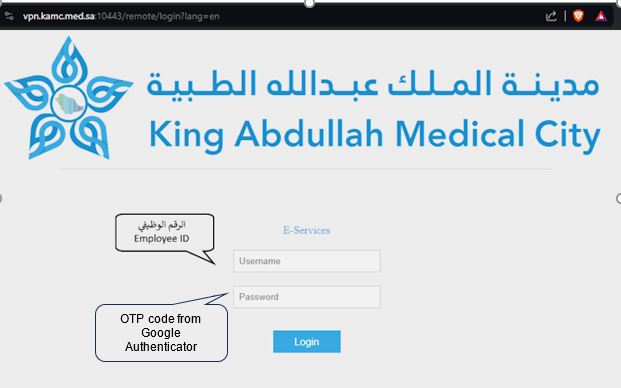
When attempting to connect remotely (VPN) or accessing the "Medical City Applications" page:
In the username field: Enter your employee ID.
In the password field: Enter the code displayed in the Google Authenticator app (not your regular password).
I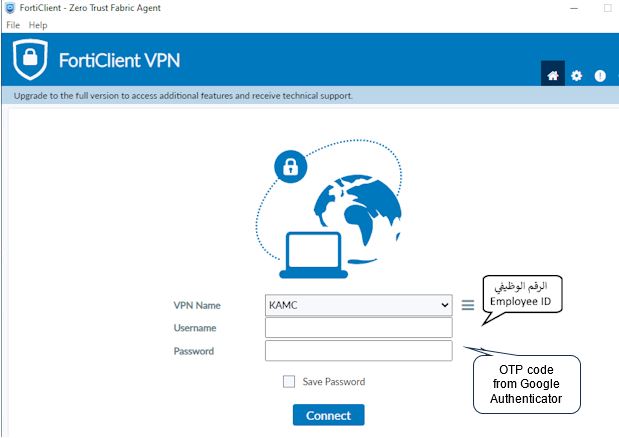
How to access KAMC's applications from the internet?
When accessing applications portal through KAMC's website (www.kamc.med.sa), you will enter your username as usual. However, in the password field, you will only need to enter the OTP code displayed in the Google Authenticator mobile application, and you do not need to enter a password.